REX transfer is required in case the exporter number on the REX need to be changed (Self transfer) or REX need to be sent to another client group ID with the updated exporter number. No other data changes on the REX.
NOTE - Receiving system will get the data against REX number from Department database record with the updated exporter number. In case if any information need to be updated on REX then first submit the updated information to department before making an attempt to transfer the REX.
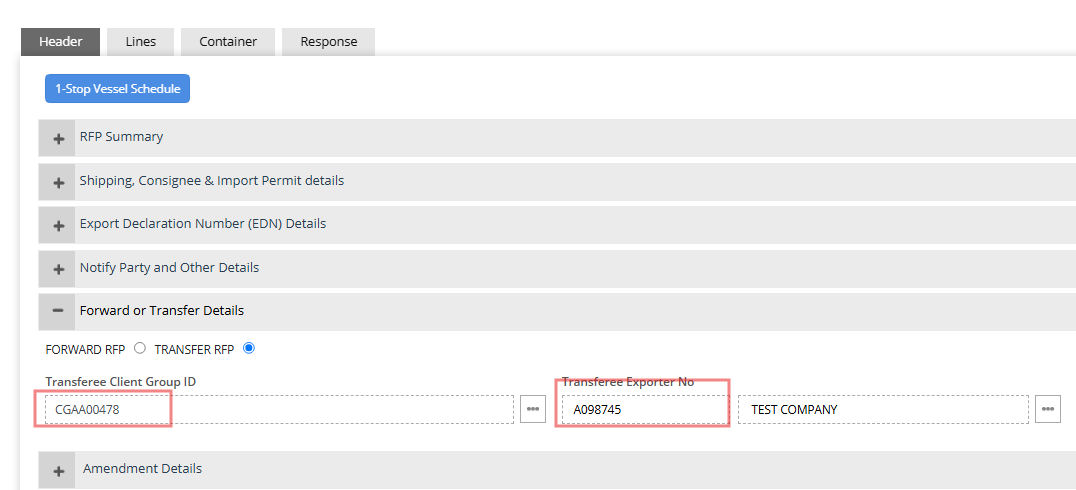
Step 1 - Click on Forward or Transfer Details section on REX Header and enter the Transferee client group ID and Transferee Exporter number.
Important - NEXDOC REX works on Client Group ID , earlier in EXDOC system it was EDI User Number.
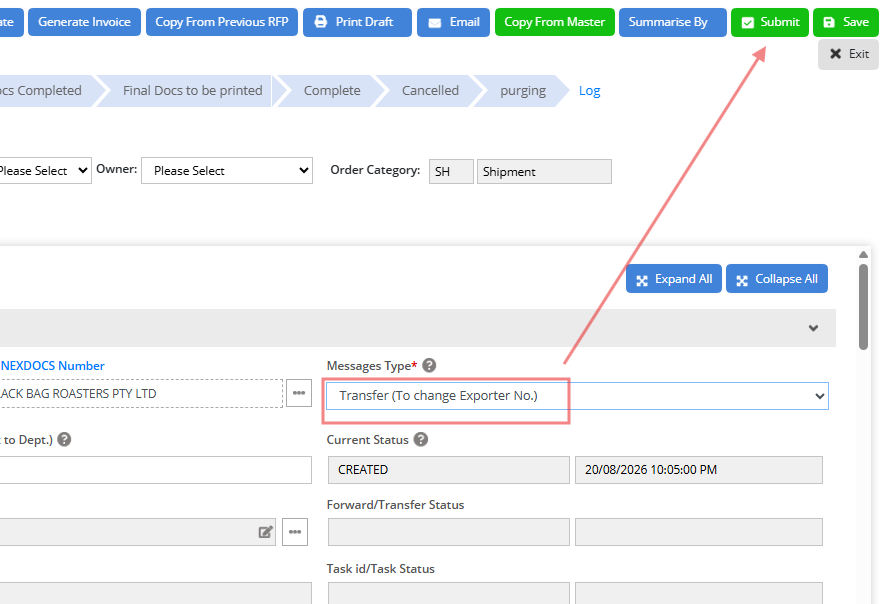
Step 2 - Select Message type to "Transfer(To change Exporter No.)" and then submit the REX. Upon successful submission REX will be transferred to the designated client group ID with the update in exporter number.
Was this article helpful?
That’s Great!
Thank you for your feedback
Sorry! We couldn't be helpful
Thank you for your feedback
Feedback sent
We appreciate your effort and will try to fix the article