This article provides information about requesting for amendment on REX at Certificate Ready state (CTRD) where change in previously supplied information is required.
Overview
A assisted amendment is needed once certificate preview is generated at CTRD but some changes like shipping details, amendment to Consignee details or weights or Product description etc. is required.
User can still request department for amendment , a service request for assistance will be generated on successful submission for department's review and approval to make those changes to certificate. They may ask for supporting document and all communication can be seen under response tab.
Note - There is NO CHARGE for this request as REX is at CTRD (Certificate Ready status)
1. Select messages type to "Amend".

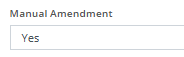
2. Under "Amendment Details" Select Manual Amendment as "Yes".
3. Give the reason for Amendment under the " Amendment Reason" field.

4. Kindly make the required changes/updated need on your REX and SAVE the changes.
5. For messages type "Amend" and submit the REX.
6. Acknowledge the declaration.
6. Select ‘Submit’.
The request will go to the department for action. A Task ID number will be generated under the Task ID / Task Status field.
Once the status is Approved, you can proceed with the REX.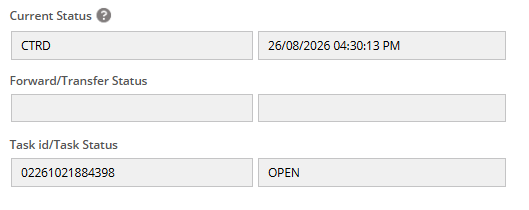
NOTE:
- Until the Task Status is not approved, do not make further submissions to the REX.
- Sea Shipment Rex takes upto 3 working days for the amendment to be Approved.
- Air Shipment REX takes 1 working day for the amendment to be Approved
Was this article helpful?
That’s Great!
Thank you for your feedback
Sorry! We couldn't be helpful
Thank you for your feedback
Feedback sent
We appreciate your effort and will try to fix the article